
FOR CAR WRAPPING SHOPS
Car wrap simulator for professionals
A color simulation system built for car wrap shops and businesses. Upload your vehicle images and launch a simulator site under your own brand. Customers try colors, finishes and designs themselves, and their spec arrives as a quote request with a rendered preview — making consultations, proposals and quotes much smoother.
What your customers see (demo)
This is our demo shop's simulator. Switch colors and finishes to get a feel for it.
#FFFFFFGloss
* On-screen colors and textures are approximate and may differ from the actual film depending on your display and lighting. Please check physical samples at the shop before deciding on a color.
Sound familiar?
- Swatch books don't convey what the whole car will look like
- Customers say “I'll talk it over with my family” and never come back
- Inquiries like “How much for something dark?” are vague and take time to clarify
- Building proposal decks and comparison images takes effort every time
- You get compared on price alone, and your expertise doesn't come across
Car wraps are hard for customers to picture before installation. Showing a realistic preview with a professional simulator — and letting customers settle the spec themselves — makes your proposals more convincing and shortens the road to a quote.
Key features
Published under your brand
Set your logo, brand colors and theme (9 to choose from) and publish on your shop's own URL. It works as your official simulator, with our name kept out of the way.
Digital swatch books
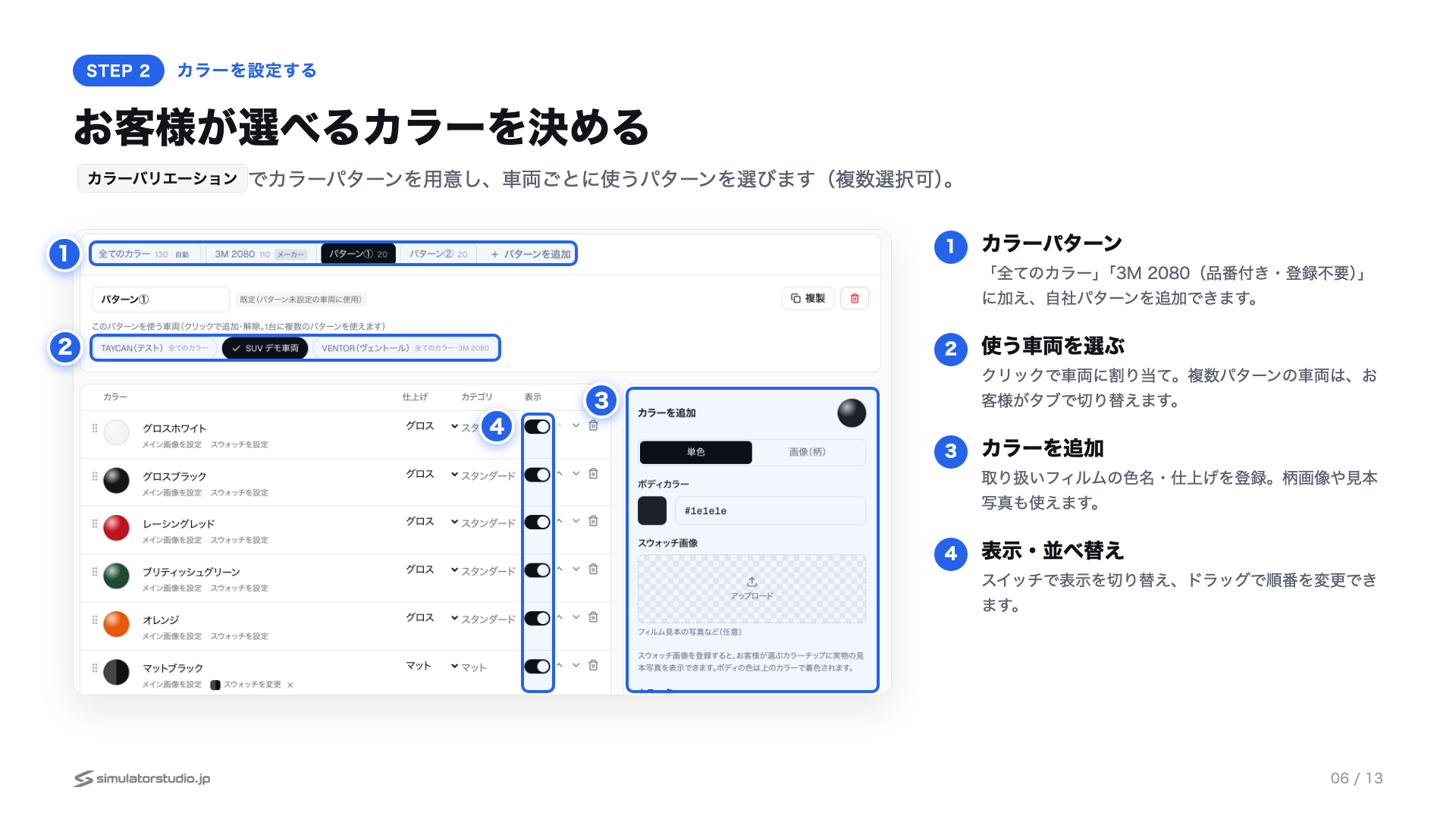
A full-spectrum palette and popular film colors (with product codes) are ready without setup. Register the films you carry as your own swatch book.
6 finishes, realistically rendered
From a single shaded body image, gloss, matte, satin, metallic, carbon and chrome are rendered automatically. Compare finishes on the spot.
Parts and design proposals
Layer colors on wheels and aero parts, or add stripes and logos. Great for proposing design wraps too.
Quote requests with a preview
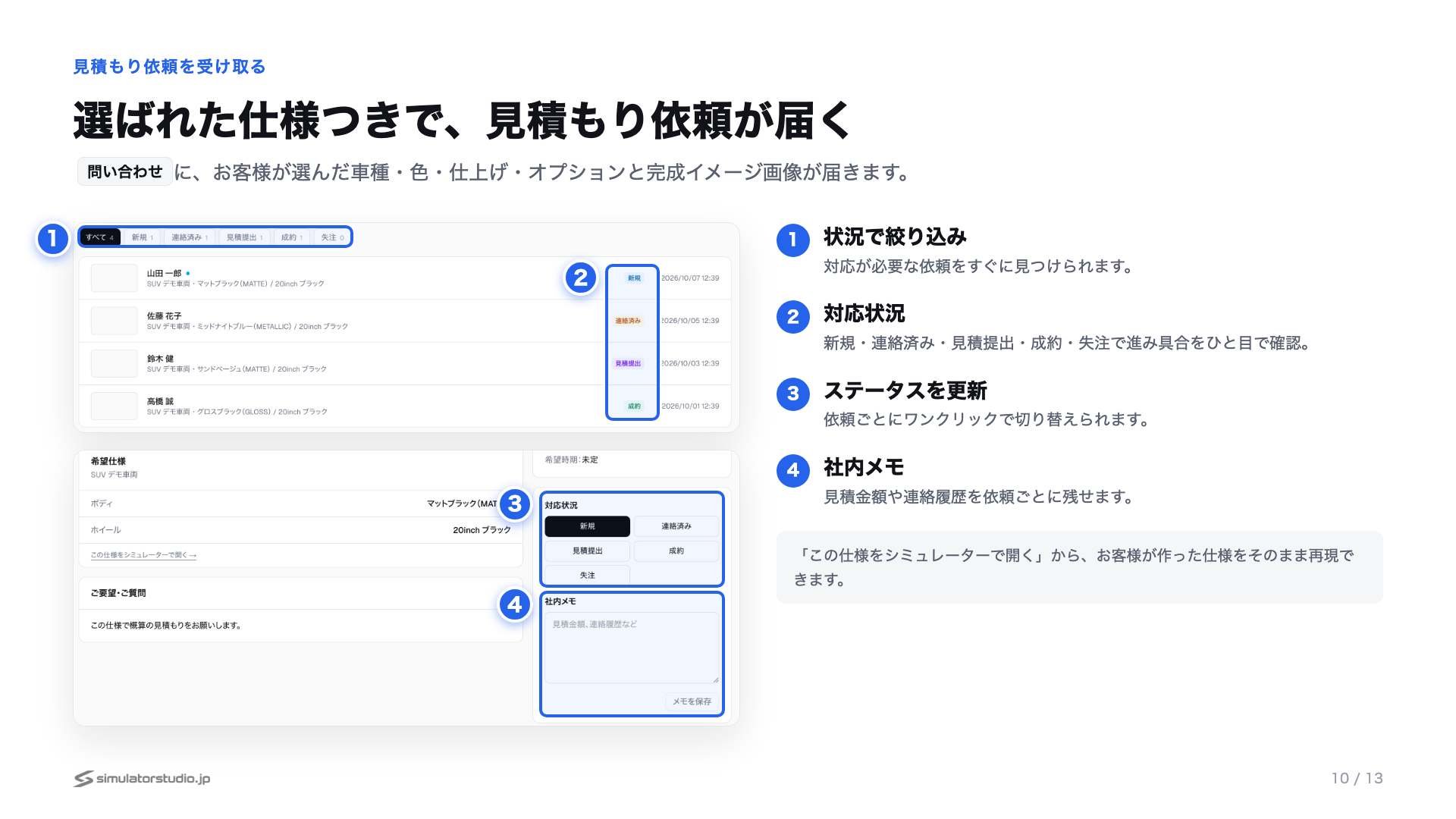
The model, color, finish, options and rendered image the customer chose arrive as a quote request. No back-and-forth — quote right away.
Inquiry & customer management
Track requests by status: new, contacted, quoted, won. Keep quote amounts and contact history as internal notes.
Analytics & reports
See popular colors and models, and how many visits became inquiries — useful for purchasing and advertising decisions (monthly report on Standard and up).
Sharing & embedding
Customers can save the preview as an image or share it by URL or messaging apps. On Standard and up, embed the simulator directly in your own website.
Use cases
In-store consultations
Choose colors together with the customer on a tablet, settle the spec and move straight to a quote.
Web & social media
Link it from your website, Instagram and Google Business Profile so customers try colors before visiting.
Flyers & events
A QR code leads to the simulator. Also great as a hands-on experience at trade shows and events.
Following up undecided customers
Saved previews and share links help customers talk it over with family, so you don't lose them.
Getting started
- 1Sign up free and create your shop (just choose a name and URL)
- 2Upload your vehicle images (PNG)
- 3Choose the colors (swatches) customers can pick
- 4Set your logo and theme to match your shop
- 5Publish and share the URL on your website, social media and flyers
For detailed steps, see How it works.
Pricing
| Plan | Monthly (excl. tax) | Best for |
|---|---|---|
| Light | ¥27,000¥29,700 incl. tax | Start attracting customers with your own simulator URL |
| Standard | ¥45,000¥49,500 incl. tax | Embed it on your website and grow inquiries |
| Premium | ¥89,000¥97,900 incl. tax | Unlimited vehicles, fully under your own brand |
Start with a 14-day free trial. For a full feature comparison, see Pricing.
FAQ
- Q. Do I need technical skills or development work?
- A. No. Register vehicle images (PNG) in the dashboard, choose colors and a theme, and publish. No custom development or agency needed.
- Q. How do I prepare vehicle images?
- A. Two images are enough: the whole car with a transparent background, and a cut-out of just the body panels that change color. Start by trying the built-in sample vehicle.
- Q. Can I use the colors of the films I carry?
- A. Yes. Register color names, finishes and product codes to build your own swatch book. Image-based swatches for specialty films like carbon patterns and color-shift are available on Standard and up.
- Q. Can I put it on my own website?
- A. Every plan includes your own URL (yourshop.simulatorstudio.jp), and on Standard and up you can embed it directly in your website's pages.
- Q. What does it cost, and is there a contract period?
- A. Plans start at ¥27,000/month (excl. tax), billed monthly. Cancel anytime from the dashboard. After the 14-day free trial, you are never switched to a paid plan automatically.
- Q. Do customers need to install an app?
- A. No. It works on phones and computers — just open the URL.